Day 6 | Linux & Shell Scripting

Hey there, I'm Sarat Motamarri, an aspiring engineer mastering the art of DevOps & AWS. If you're as passionate about the cloud and open-source wizardry as I am, you're in the right place! Let's explore the skies together 🚀🔮 #CloudEnthusiast #DevOpsDreamer"
What is OS (Operating System)?
An operating system (OS) is system software that manages computer hardware, and software resources, and provides various services for computer programs. It acts as an intermediary between the computer's hardware and the applications running on it. The operating system serves as a foundation for a computer's functionality and enables users to interact with their devices.
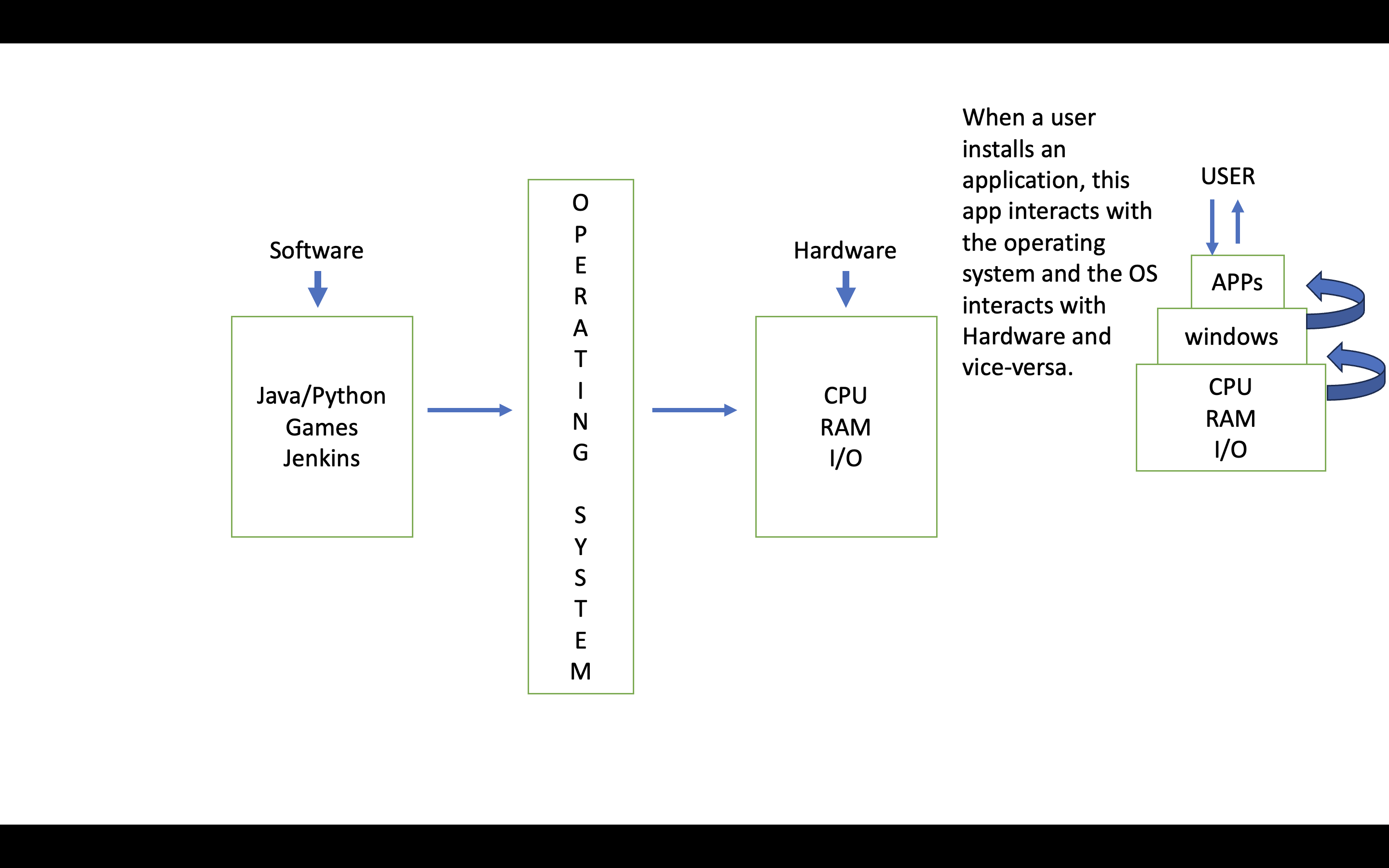
Why LINUX is a popular Operating System (OS) when compared to other Operating Systems?
Free
Opensource
Secure
Distributions (Ubuntu, CentOS, RedHat, Alpine, Debian)- are nothing but vendors that provide Linux Operating System.
Fast (In production environments, the effectiveness of an application hinges on its ability to harness advanced concepts like multithreading. However, even with these capabilities, if the underlying operating system lags in responding to requests, the app's potential remains untapped. This is where Linux shines as a preferred choice. Its exceptional speed and efficiency make it the OS of choice for many production environments, ensuring that applications can fully utilize advanced features and deliver optimal performance.)
Architecture of Linux
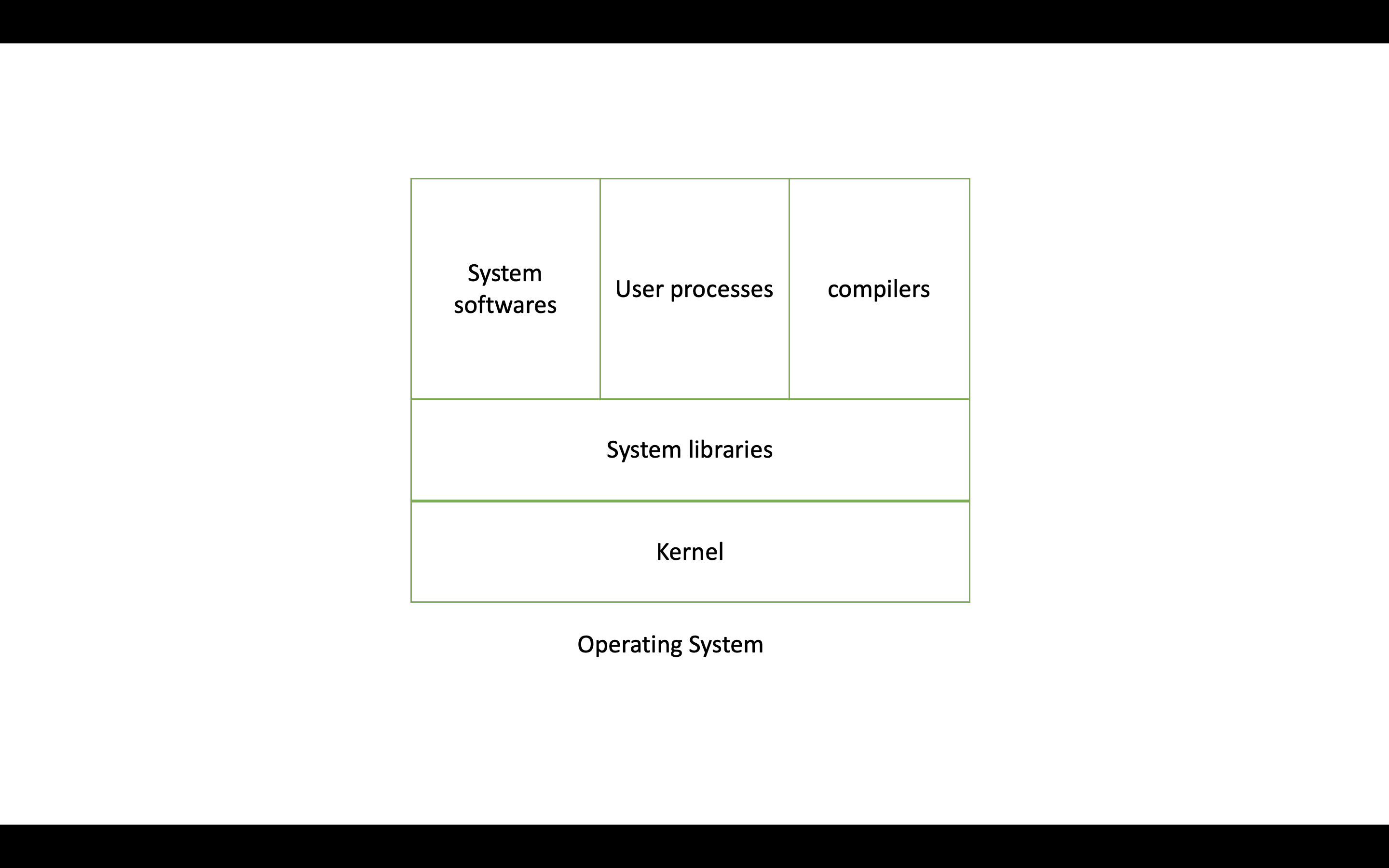
KERNEL - It is the heart of the Operating System because the responsibility of the kernel is to establish communication between hardware and software. Important Aspects namely:
It is the heart of the Operating System which does Device Management
It is responsible for Memory Management
It is responsible for Process Management
It is responsible for handling System calls
SYSTEM LIBRARIES - They are like toolkits for software. They provide pre-written code that programs can use to perform common tasks, such as reading files or connecting to the internet. These libraries save time and effort for developers, making it easier to create and run software on Linux.
COMPILERS - Compilers are tools that convert human-readable source code into machine-executable programs, facilitating software development in Linux.
USER PROCESSES - User processes are applications and programs running on the system
SYSTEM SOFTWARES - It manages the hardware, allocates resources, and ensures different software components work together harmoniously.
SHELL SCRIPTING
What is Shell?
It serves as the means of communicating with the operating system. For instance, in the realm of Windows, with its graphical user interface (GUI), tasks like creating files or folders are straightforward. However, in the domain of production environments, where Linux is the preferred operating system for server hosting, GUI might not be available. Thus, the primary recourse is the command-line interface, where actions are carried out by issuing text commands. In Linux, the way we interact is with "SHELL Commands".
POPULAR SHELL COMMANDS
ls: List files and directories in the current location.ls -ltr: list the files with their properties i.e. who's the owner, group owner, is it a file or a folder, what permissions does it have, (like read, write etc) size of the file, timestamp etc.cd: Change the working directory.cd ..: go back to one directory.cd ../..: go back to two directories.pwd: Print the current working directory.mkdir: Create a new directory.touch: Create an empty file.cp: Copy files and directories.mv: Move or rename files and directories.rm: Remove files and directories.cat: Display the contents of a file.grep: Search for patterns in files.echo: Display a message or output.kill: Terminate processes.chmod: Change file permissions.sudo: Execute commands with superuser privileges.vi: Create a file and write inside the file:-i: insert mode.wq!: to save the file.
free: Displays information about system memory usage and available free memory.nproc: Displays the number of processing units available to the current process(number of CPUs).df -h: Displays the disk size.top: Used to monitor system processes and resource usage in real time.
